


Skip to content

Hold to speak,
release to type

Open-source dictation that types at your cursor in any app. Recognition runs offline with a local model, or on the built-in service or your own provider; AI polish tidies the wording with the preset you choose.

  • Windows, macOS, Linux and Android
  • With a local model, the audio stays on your computer
  • The built-in service is free and needs no key
  • Open source, AGPL-3.0

Hold Ctrl+Alt+Space and speak; the overlay shows what you say

The overlay while you speak: …on Monday at ten. No, sorry, at two. Uh.

Release the keys; the text is proofread and inserted at your cursor

Inserted at the cursor

The review is on Monday at two. Please bring the latest numbers.

The overlay after inserting: Inserted 64 chars, Paste.
A real dictation with the built-in service and the Proofread preset. The overlays are frames of a screen recording.
Try Voltip in your browser, with nothing to installSay a sentence and see the recognised text and its AI-polished version a few seconds later.Try it now

What happens between the shortcut and the cursor

Each step has its own settings, and AI polish can be turned off. If the dictionary, AI polish or the rules fail, the dictation completes with the text from the step before.

  1. Recording

    Hold to talk, or press once to start and again to stop; record the microphone, the sound the computer plays, or both.

  2. Recognition

    A local model, the built-in service or your provider, on the whole recording or as you speak. Your dictionary's right spellings and the scene's terms go with the recording as hotwords, so cloud recognition keeps them; local models take none.

  3. Dictionary

    After recognition, what a word is heard as is replaced with its right spelling, for local models and cloud services alike.

  4. AI polish Optional

    Tidies the text with the current preset or scene: filler words go, punctuation comes in, corrections are kept.

  5. Rules

    Rewrite the final text in list order, by a literal match or a regular expression.

  6. Insert

    Pastes at your cursor and puts the clipboard back, keeping a copy in the history on this computer.

The whole process is described on What is Voltip.

The text is tidied before it goes in

AI polish removes filler words, fixes the punctuation and keeps the correction you made, without rewording what you said. You can turn it off.

  1. Recognised words

    Um, the review is on Monday at ten, no, sorry, at two. Uh, please bring the latest numbers.

    Inserted text Actual output

    The review is on Monday at two. Please bring the latest numbers.

  2. Recognised words

    um so I think we should uh ship the fix on friday and then update the docs next week

    Inserted text Example

    I think we should ship the fix on Friday and then update the docs next week.

  3. Select text, hold Ctrl+Alt+E and say

    Turn it into a bulleted list.

    Selected textLet's meet on Thursday at three in the main conference room to go over the release plan.

    The review is on Monday at two. Please bring the latest numbers.

    Replaced with Actual output

    - Let's meet on Thursday at three in the main conference room to go over the release plan.- The review is on Monday at two. Please bring the latest numbers.

“Actual output” comes from a screen recording of Voltip. “Example” is illustrative; real results depend on the AI model you choose.

A preset decides how the text is tidied

Eight are built in, with their prompts open to read, and any of them can be copied into a preset of your own and changed.

  • Proofread is the default; switch from the home page, the tray or next to the AI Polish switch
  • With scenes on, the app you are writing in picks the preset
Recognised words

um so the thursday release let's push it to next monday and uh testing still has two open issues I'll let everyone know once they're fixed

  • ProofreadFixes typos and punctuation, removes filler words

    So the Thursday release, let's push it to next Monday, and testing still has two open issues. I'll let everyone know once they're fixed.

  • Clarify intentKeeps the corrections, lists several points

    - Push the Thursday release to next Monday.- Testing still has two open issues; let everyone know once they're fixed.

  • FormalComplete, formal written language

    The Thursday release will be postponed to next Monday. Testing still has two open issues, and I will inform everyone once they have been resolved.

  • Chinese ⇄ EnglishFixes recognition errors, then translates

    周四的发布推迟到下周一。测试还有两个问题待解决,修复后我会通知大家。

Example outputs; real results depend on the AI model you choose. The others are Prompt optimizer, Casual chat, Key points and Punctuation only.

Scenes: the preset and extra instructions follow the app

Built-in scenes apply once you turn them on; you can add a scene for any app.

  • Coding

    PresetProofread
    • VS Code
    • Cursor
    • Kiro
    • JetBrains
    • iTerm2
    • Warp
    • Ghostty
    • Alacritty
    • WezTerm

    And Windows Terminal, PowerShell and each system's own terminal.

    Coding agents in the terminal

    • Codex
    • OpenCode
    • Pi Agent

    And Claude Code and other coding agents that run in a terminal.

    Keeps code, commands, paths, identifiers and Markdown as they are.

  • Office writing

    PresetFormal
    • Notion
    • Obsidian
    • Thunderbird
    • LibreOffice Writer

    And Outlook, Word, WPS, OneNote, Typora, and Mail and Pages on a Mac.

    Complete sentences and natural paragraphs for mail and documents, with no invented greetings or facts.

  • Chat

    PresetCasual chat
    • WeChat
    • QQ
    • Telegram
    • Discord

    And WeCom, Slack, Teams, DingTalk, Feishu, Lark, and Messages on a Mac.

    No extra instructions: the Casual chat preset writes short, conversational sentences without a closing full stop.

  • Legal, Medical, Finance, Academic

    PresetProofread
    • Legal
    • Medical
    • Finance
    • Academic

    Each field is a scene of its own and applies once you add the apps you use.

    Strict proofreading that keeps specialist terms as they are and writes numbers, units and dates correctly.

Three ways to recognise speech

On this computer, with the built-in service or with your own provider; switch at any time on the Speech models page.

On this computer

Uses a model downloaded to this computer

The audio stays on this computer

Cost
Free
Needs
One model download, from 227 MB
GPU
Qwen3-ASR uses Vulkan on Windows and Linux and Metal on macOS, and the processor without a graphics card

Models

  • Qwen3-ASR 0.6B
  • Qwen3-ASR 1.7B
  • SenseVoice Small
  • Paraformer

Built-in service Default

Run by the Voltip project

The server keeps no recordings or text

Cost
Free, shared by all users, limited per address
Needs
No key
Preview
The overlay shows the words as you speak

AI polish models

  • Qwen3.8 27B
  • GPT-OSS 120B
  • GPT-OSS 20B

Your provider

Uses your own API key

The recording goes straight to the provider you chose

Cost
The provider's prices; some have a free allowance
Needs
An API key from the provider
Key
Kept in the system keychain

Recognition providers

  • OpenAI
  • Groq
  • SiliconFlow
  • Alibaba Cloud Model Studio
  • OpenAI-compatible

AI polish

After recognition, a language model tidies the text. It can run on the built-in service, your provider, or Ollama on your own computer.

  • OpenAI
  • Groq
  • Google AI Studio
  • SiliconFlow
  • Model Studio
  • DeepSeek
  • Kimi
  • Zhipu GLM
  • Volcengine Ark
  • Tencent Hunyuan
  • Xiaomi MiMo
  • OpenRouter
  • Ollama

On an NVIDIA L40S, Qwen3-ASR 0.6B recognised 16 seconds of Chinese speech in 0.16 s on the GPU and in 2.87 s on 8 processor threads. See Local recognition and Cloud services.

Make it fit the way you work

These are in the desktop app; the ones that start off can be turned on in Settings.

  • Dictionary and rules

    Add a word the recogniser gets wrong once, and it is spelled right from then on; cloud recognition and AI polish get the right spelling as a hint too. Rules rewrite the text last, with regular expressions if needed. In the history, select a misheard word to add it.

    cube controlkubectl

    Dictionary and rules

  • Start with a single key

    Right Ctrl, Right Alt, Fn on a Mac, or the middle or side mouse buttons can start dictation on their own. Pressing another key while you hold one cancels the recording, so Right Ctrl + C keeps working.

    Right CtrlRight AltFn

    Shortcuts and recording modes

  • Computer audio and long recordings

    Record the microphone, the sound the computer plays, or both, with the speakers' echo removed when mixing. A recording can run up to 2 hours and be exported as SRT subtitles or text.

    • Microphone
    • Computer audio
    • Mixed

    Recording source

  • When a model's quota runs out

    Recognition and AI polish each keep a list of up to 8 fallback models. When the selected model's quota is used up, Voltip moves on to the next and the dictation still goes through; other errors, such as a lost connection or a wrong key, are reported and never switch models.

    1. Qwen3.8 27B
    2. GPT-OSS 120B
    3. GPT-OSS 20B

    When a model's quota runs out

  • AI tools

    Claude Code, Codex and other AI tools can read the history, dictionary and rules over MCP, collect the misrecognitions that keep coming back, and add entries and rules with your permission. Every change can be undone.

    • Claude Code
    • Codex
    • MCP

    AI tools

  • Local service

    Other programs send a recording to an OpenAI-compatible API and get back text processed by the same recognition, dictionary, presets and rules. Turn it on in the app, or run voltip-server on a Linux server without a desktop; by default it accepts connections from this computer only, and every request needs an access token.

    voltip-server --scene coding --preset prompt

    Local service

Your phone as a microphone and keyboard

Pair an Android phone with the computer and hold to talk on the phone. The computer recognises the speech with its own settings and inserts the text at its cursor. With no computer online, the phone transcribes on its own.

  • Pair once

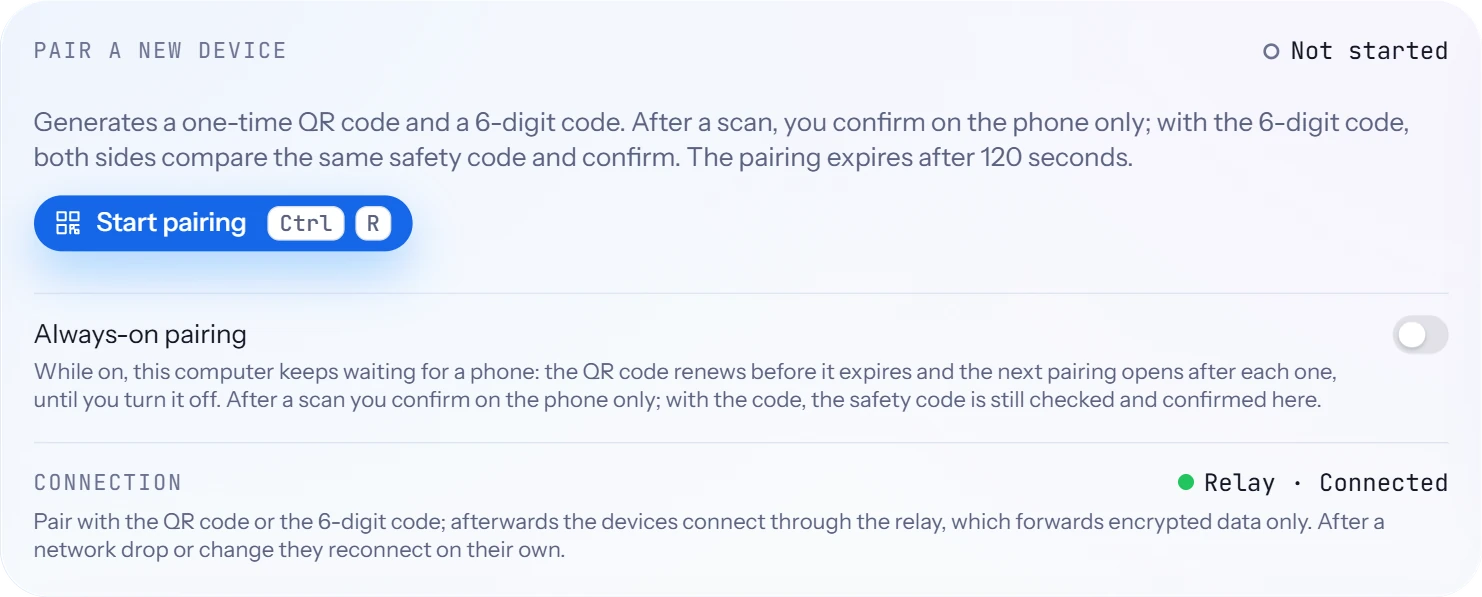
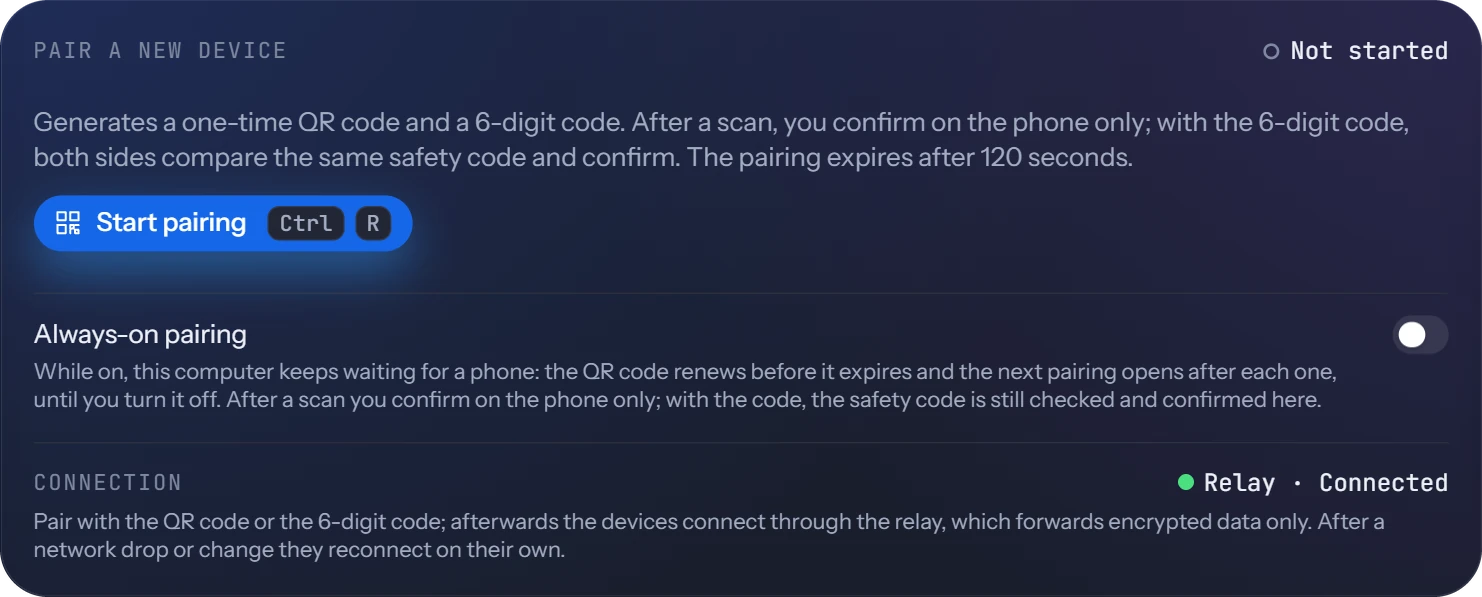
    Scan the QR code on the computer and confirm on the phone; with the 6-digit code, also check that both screens show the same safety code.

  • Hold to talk on the phone

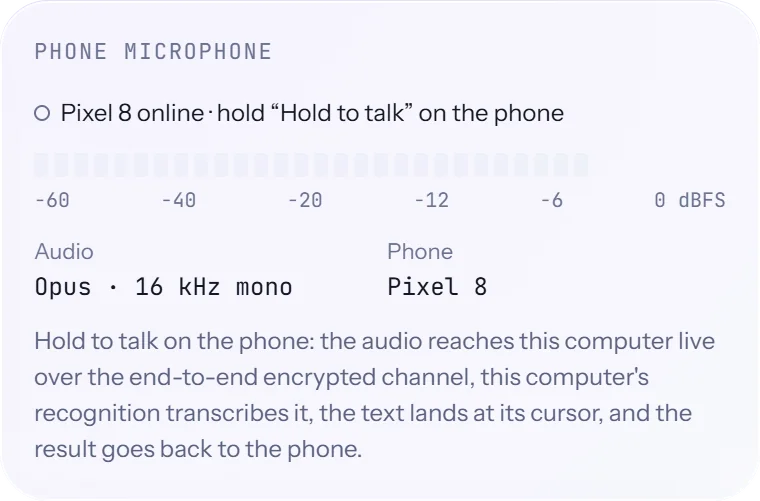
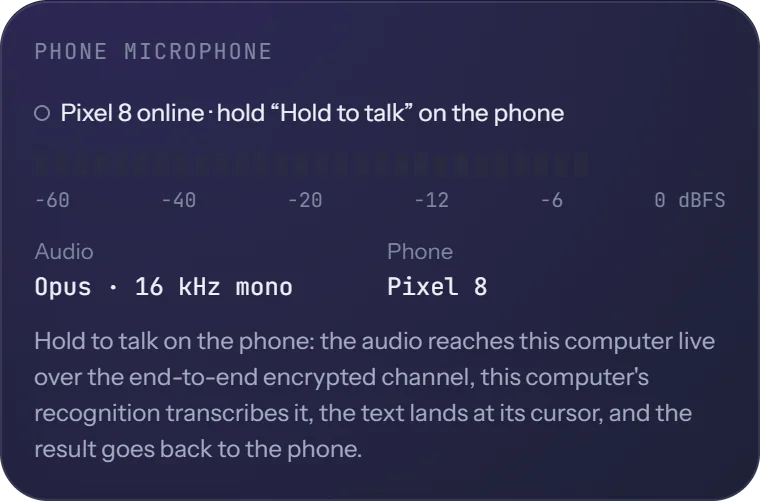
    The audio streams to the computer, compressed with Opus and encrypted end to end. The computer recognises it and inserts the text at its cursor.

  • Send text or the clipboard

    Type on the phone or send its clipboard, and the computer inserts it like a dictation result.

  • The computer's history on the phone

    The computer's history and settings are synced to the phone, to read there.

  • On any network

    The devices connect through a relay that forwards encrypted data only, and reconnect on their own after a change of network.

The Phone page on the computer: pairing with a QR code and a 6-digit code.The Phone page on the computer: pairing with a QR code and a 6-digit code.Phone microphone: the paired phone is online; hold to talk on it.Phone microphone: the paired phone is online; hold to talk on it.
The Phone page on the computer: pairing, and the paired phone's microphone.

Windows, macOS, Linux
and Android

The desktop app is the same on all three systems; the Android app makes a phone the computer's microphone and keyboard.

  • Windows 10 and 11

    Available
    Packages
    Per-user installer or portable zip, x64
    GPU
    Vulkan
  • macOS 11 or later

    Available
    Packages
    A dmg for Apple silicon and one for Intel
    GPU
    Metal
  • Linux

    Available
    Packages
    .deb or AppImage, x64; X11 and Wayland
    GPU
    Vulkan
  • Android 8.0 or later

    Available
    Package
    APK, 64-bit Arm
    Recognition
    By the paired computer, or on its own
powershell
irm https://raw.githubusercontent.com/sunerpy/voltip/main/scripts/install.ps1 | iex
bash
curl -fsSL https://raw.githubusercontent.com/sunerpy/voltip/main/scripts/install.sh | sh

One command picks the right package for the computer, checks it against the release's SHA256SUMS and installs it. Packages for every platform and their checksums are on the releases page; the install guide covers each platform.

An iOS app is planned for a later release. Packages for Windows on ARM and Linux on ARM are not planned for now.

Questions

More questions and troubleshooting are on the Questions page.

Can I use Voltip without an internet connection?

Yes, with a local model. Download it once; recognition then works offline. AI polish needs a service, unless you run Ollama on your computer.

Does Voltip listen all the time?

No. The microphone opens when you press the shortcut and closes when the recording ends.

Where do my recordings and text go?

It depends on the services you choose. Local recognition sends nothing; cloud recognition sends the recording to the built-in service or the provider you set up; AI polish sends text only, never audio. See Privacy.

Does the built-in service cost anything or need a key?

No. The Voltip project runs it, all users share it, and requests are limited per address. For AI polish you can rely on, use a provider of your own.

My network needs a proxy

Choose how Voltip connects under Settings → Network. It follows the system's proxy settings by default, or uses a proxy server you enter. Recognition, polish, model downloads, updates and the connection to your phone all follow this setting.

Do I have to hold the shortcut the whole time?

No. Choose Press to start, again to stop, or Hold or press, where a short press locks the recording. A recording stops on its own at the length you set; Voltip has no wake word and does not stop when it hears silence. See Shortcuts and recording modes.

Are the packages signed?

The Windows installer is not code-signed yet, so SmartScreen warns on the first start. The macOS app is signed with the project's own certificate but not notarized by Apple, so you confirm it once on first opening. Every release comes with SHA256SUMS and build attestations, and the one-line install checks the download against SHA256SUMS. See Install.

Is there an iPhone app?

An iOS app is planned for a later release. An Android app is available now.

Download Voltip

Free for Windows, macOS, Linux and Android, with the source code under AGPL-3.0.